> ## Documentation Index
> Fetch the complete documentation index at: https://docs-staging.auth0-mintlify.app/llms.txt
> Use this file to discover all available pages before exploring further.
> Configure your Auth0 tenant as the Resource App Authorization Server to accept ID-JAG requests and issue access tokens for your API.
# Set up Auth0 as Resource App
export const ReleaseStageNotice = ({feature, stage, plans, contact, terms}) => {
const stageTextMap = {
"beta": "Beta",
"ea": "Early Access"
};
const stageText = stageTextMap[stage] || "a product release stage";
const prsLink = "/docs/troubleshoot/product-lifecycle/product-release-stages";
const linkify = (text, url) => {
return {text};
};
const includeDetails = (plans, contact, terms) => {
const hasDetails = terms || plans || contact;
if (!hasDetails) return null;
return
{plans && <>This feature is available for {linkify(`${plans} plans`, "https://auth0.com/pricing")}. }
{contact && "To participate, contact " + contact + ". "}
{terms && <>By using this feature, you agree to the applicable Free Trial terms in Okta's {linkify("Master Subscription Agreement", "https://www.okta.com/legal")}.}
;
};
return
The {feature} feature is in {linkify(stageText, prsLink)}.
{includeDetails(plans, contact, terms)}
;
};
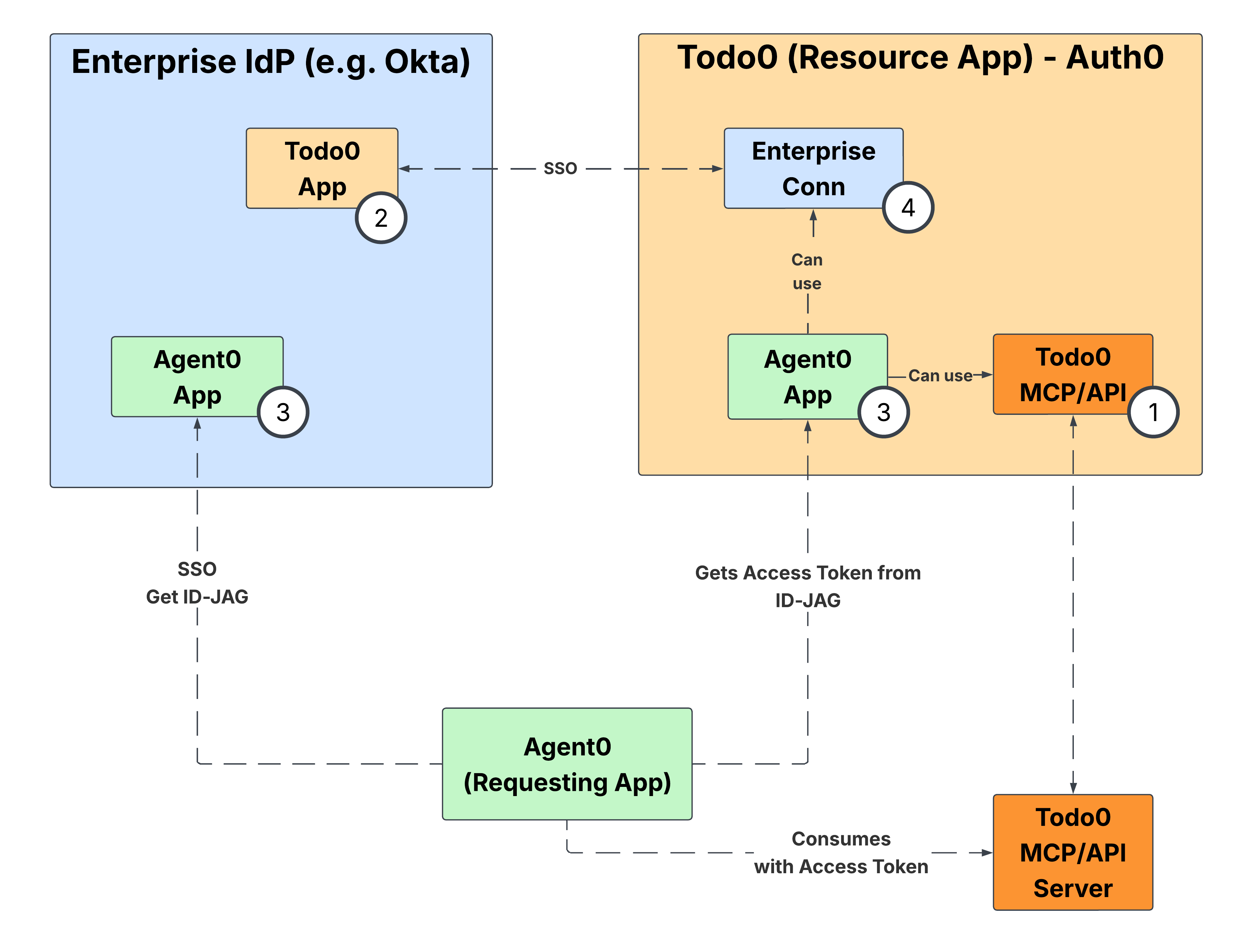
By configuring your Auth0 tenant as the Resource App Authorization Server, your SaaS application can accept incoming [ID-JAG](https://datatracker.ietf.org/doc/draft-ietf-oauth-identity-assertion-authz-grant/) requests without requiring any code changes. This enables you to issue access tokens in response to these requests, allowing AI agents and other applications to seamlessly consume your MCP or SaaS API on a user's behalf.
 ## Get started
To configure your Auth0 tenant as the Resource App:
1. Complete [Environment Setup](/docs/ai-agents-mcp/cross-app-access/set-up-xaa-test-environment) to configure your API and register a test Requesting App in your Auth0 tenant.
2. Configure the enterprise IdP by following the applicable guide in IdP Integration — [Okta as OIDC IdP](/docs/ai-agents-mcp/cross-app-access/idp/okta-as-oidc-idp) or [Okta as SAML IdP](/docs/ai-agents-mcp/cross-app-access/idp/okta-as-saml-idp) — depending on the IdP and protocol you use to federate with it.
3. Once both sides are configured, read [End-to-end Testing](/docs/ai-agents-mcp/cross-app-access/end-to-end-testing) to verify the full XAA flow.
## Get started
To configure your Auth0 tenant as the Resource App:
1. Complete [Environment Setup](/docs/ai-agents-mcp/cross-app-access/set-up-xaa-test-environment) to configure your API and register a test Requesting App in your Auth0 tenant.
2. Configure the enterprise IdP by following the applicable guide in IdP Integration — [Okta as OIDC IdP](/docs/ai-agents-mcp/cross-app-access/idp/okta-as-oidc-idp) or [Okta as SAML IdP](/docs/ai-agents-mcp/cross-app-access/idp/okta-as-saml-idp) — depending on the IdP and protocol you use to federate with it.
3. Once both sides are configured, read [End-to-end Testing](/docs/ai-agents-mcp/cross-app-access/end-to-end-testing) to verify the full XAA flow.