> ## Documentation Index
> Fetch the complete documentation index at: https://docs-staging.auth0-mintlify.app/llms.txt
> Use this file to discover all available pages before exploring further.
# Navigate Auth0 Dashboard
> Explore Auth0 Dashboard's redesigned navigation with an improved information architecture and more structured layout.
export const ReleaseStageNotice = ({feature, stage, plans, contact, terms}) => {
const stageTextMap = {
"beta": "Beta",
"ea": "Early Access"
};
const stageText = stageTextMap[stage] || "a product release stage";
const prsLink = "/docs/troubleshoot/product-lifecycle/product-release-stages";
const linkify = (text, url) => {
return {text};
};
const includeDetails = (plans, contact, terms) => {
const hasDetails = terms || plans || contact;
if (!hasDetails) return null;
return
{plans && <>This feature is available for {linkify(`${plans} plans`, "https://auth0.com/pricing")}. }
{contact && "To participate, contact " + contact + ". "}
{terms && <>By using this feature, you agree to the applicable Free Trial terms in Okta's {linkify("Master Subscription Agreement", "https://www.okta.com/legal")}.}
;
};
return
The {feature} feature is in {linkify(stageText, prsLink)}.
{includeDetails(plans, contact, terms)}
;
};
Auth0 Dashboard Navigation is is available as an Early Access feature on all Auth0 plans.
Feedback is collected throughout the Early Access period.
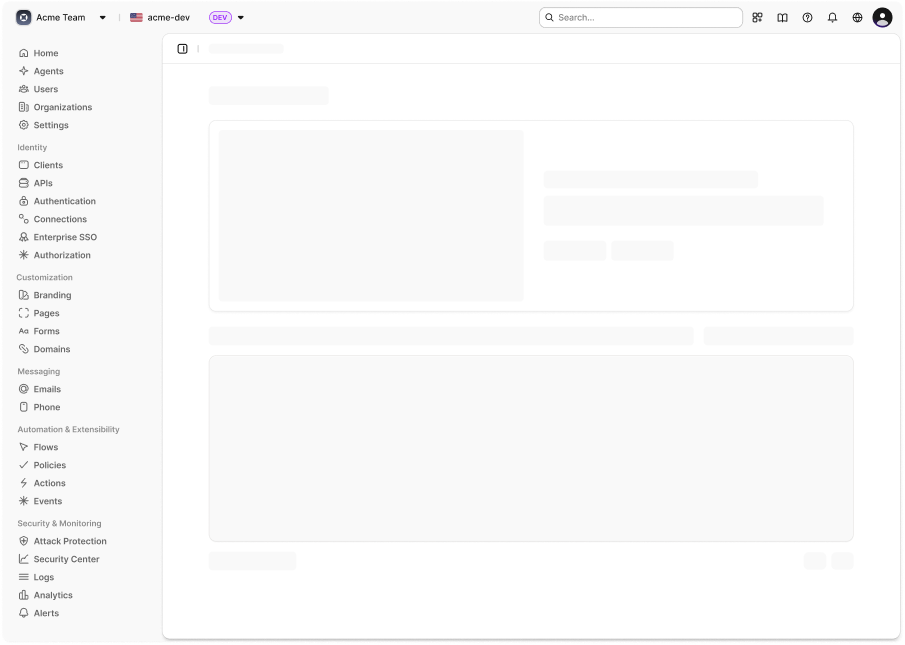
The navigation menu in Auth0 Dashboard helps you find what you need faster. The navigation features an improved sidebar with organized sections, a unified breadcrumb system, and improved visual hierarchy.
 ## Enable Auth0 Dashboard navigation
When the navigation feature is available for your tenant, an opt-in popup displays the first time you log in:
1. Select **Try now** to enable the new navigation immediately, or **Maybe later** to dismiss the popup.
* If you choose **Maybe later**, the popup will reappear in 14 days.
2. After opting in, you can disable the navigation feature from your user profile menu:
* Choose your profile icon in the top-right corner of the Dashboard.
* Click the new navigation toggle to switch back to the old navigation UI.
Your preference is saved and persists across sessions.
## How it works
The navigation in Auth0 Dashboard groups related items into logical sections with clear, workflow-focused naming for easier navigation. A sticky page action bar appears at the top of each page with breadcrumbs, tabs, actions, and the sidebar toggle button to keep important controls visible as you scroll.
Breadcrumb trails now appear in the action bar instead of scattered across page headers for consistent context navigation. The new navigation also includes a refreshed, modern layout and structure for improved usability.
The navigation features a redesigned left sidebar as you navigate between sections in Auth0 Dashboard. The sidebar is organized into the following sections:
| Section | Contains |
| -------------------------- | ---------------------------------------------------------------------------------------------------------------------------------------------------------------------------------------------------------------------------------------------------------------------------------------------------------------------------------------- |
| Primary (non-labeled) | Home: Dashboard landing for getting started
## Enable Auth0 Dashboard navigation
When the navigation feature is available for your tenant, an opt-in popup displays the first time you log in:
1. Select **Try now** to enable the new navigation immediately, or **Maybe later** to dismiss the popup.
* If you choose **Maybe later**, the popup will reappear in 14 days.
2. After opting in, you can disable the navigation feature from your user profile menu:
* Choose your profile icon in the top-right corner of the Dashboard.
* Click the new navigation toggle to switch back to the old navigation UI.
Your preference is saved and persists across sessions.
## How it works
The navigation in Auth0 Dashboard groups related items into logical sections with clear, workflow-focused naming for easier navigation. A sticky page action bar appears at the top of each page with breadcrumbs, tabs, actions, and the sidebar toggle button to keep important controls visible as you scroll.
Breadcrumb trails now appear in the action bar instead of scattered across page headers for consistent context navigation. The new navigation also includes a refreshed, modern layout and structure for improved usability.
The navigation features a redesigned left sidebar as you navigate between sections in Auth0 Dashboard. The sidebar is organized into the following sections:
| Section | Contains |
| -------------------------- | ---------------------------------------------------------------------------------------------------------------------------------------------------------------------------------------------------------------------------------------------------------------------------------------------------------------------------------------- |
| Primary (non-labeled) | Home: Dashboard landing for getting started
Agents: AI Agents configuration
Users: User management
Organizations: Organization management
Settings: Tenant configuration and account management |
| Integration | Applications: Register and manage your applications
APIs: Register and manage your APIs
Authentication: Configure authentication (Database, Passwordless)
Connections: Manage social connections
Enterprise SSO: Manage enterprise connections and self-service profiles
Authorization: Create and manage roles |
| Customization | Branding: Visual editor for Universal Login theming
Pages: Universal Login and Forms page customization
Portals: Visual editor for portal pages
Domains: Manage custom domains |
| Messaging | Emails: Email templates and configuration
Phone: Phone messaging settings |
| Automation & Extensibility | Actions: Create and manage Auth0 Actions
Events: Stream authentication events to external services
Extensions: Official and third-party add-ons
Rules: Legacy rules (for existing configurations)
Hooks: Legacy hooks (for existing configurations) |
| Security & Monitoring | Attack Protection: Bot, IP throttling, Brute-force, and Breached Password Protection
Access Control: Access Control lists
Security Dashboard: Security overview and threat metrics
Logs: View activity logs
Analytics: Usage analytics and reporting |
## Browser support
The new navigation requires modern browsers with `localStorage` support for sidebar state persistence. If you encounter any issues, you can always switch back to the classic navigation using the profile menu toggle.
## Learn more
* [Auth0 Dashboard Overview](/docs/get-started/auth0-overview/dashboard)
* [Dashboard Activity](/docs/get-started/auth0-overview/dashboard/activity)
* [Search and Filter by Fields in Auth0 Dashboard](/docs/get-started/auth0-overview/dashboard/search-and-filter-auth0-dashboard)
* [Tenant Settings](/docs/get-started/tenant-settings)