> ## Documentation Index
> Fetch the complete documentation index at: https://docs-staging.auth0-mintlify.app/llms.txt
> Use this file to discover all available pages before exploring further.

# User MFA Management

> Learn how to render a card-based UI that lets users enroll, view, and delete their own multi-factor authentication factors using the My Account API.

export const ReleaseStageNotice = ({feature, stage, plans, contact, terms}) => {
  const stageTextMap = {
    "beta": "Beta",
    "ea": "Early Access"
  };
  const stageText = stageTextMap[stage] || "a product release stage";
  const prsLink = "/docs/troubleshoot/product-lifecycle/product-release-stages";
  const linkify = (text, url) => {
    return <a href={url} target="_blank" rel="noreferrer" class="link">{text}</a>;
  };
  const includeDetails = (plans, contact, terms) => {
    const hasDetails = terms || plans || contact;
    if (!hasDetails) return null;
    return <span data-as="p">
            {plans && <>This feature is available for {linkify(`${plans} plans`, "https://auth0.com/pricing")}. </>}
            {contact && "To participate, contact " + contact + ". "}
            {terms && <>By using this feature, you agree to the applicable Free Trial terms in Okta's {linkify("Master Subscription Agreement", "https://www.okta.com/legal")}.</>}
        </span>;
  };
  return <Warning>
            <span data-as="p">
                <strong>The {feature} feature is in {linkify(stageText, prsLink)}.</strong>
            </span>

            {includeDetails(plans, contact, terms)}
        </Warning>;
};

<ReleaseStageNotice feature="Auth0 Universal Components" stage="beta" terms="true" contact="Auth0 Support" />

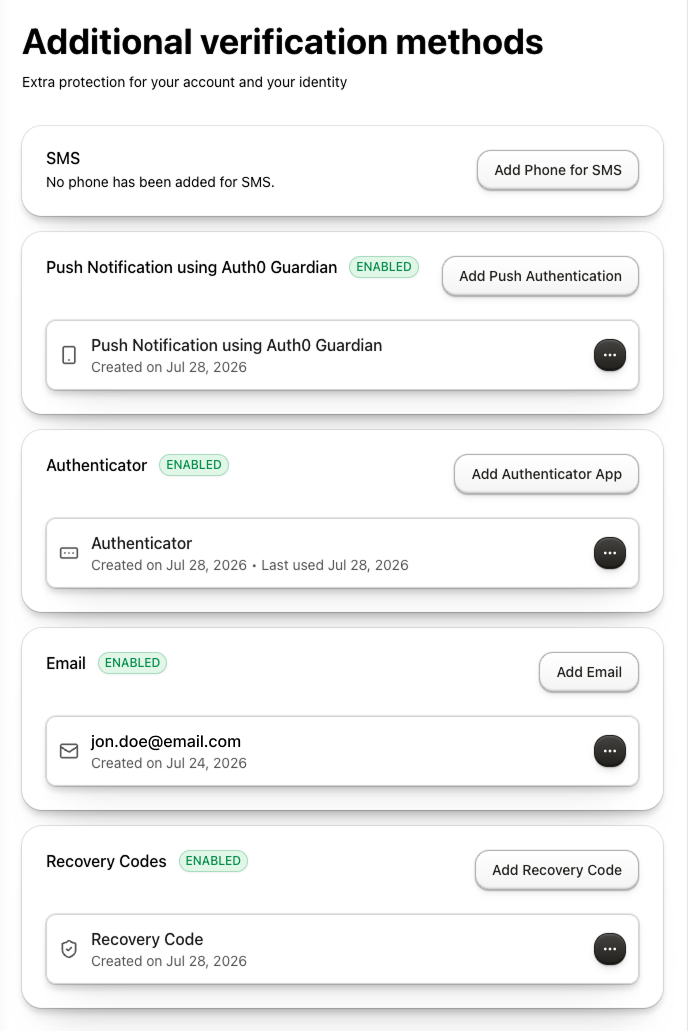
The `UserMFAManagement` component lets users enroll, view, and delete their own multi-factor authentication factors in a single card-based interface using the [My Account API](/docs/manage-users/my-account-api).

It uses the My Account API’s [authentication methods](/docs/manage-users/my-account-api#manage-authentication-methods) management capabilities to render a complete UI for managing a user’s authentication methods.

With the `UserMFAManagement` component, you do not need to orchestrate navigation, call API endpoints, or manage [state](/docs/api/authentication/authorization-code-flow/authorize-application#param-state).

<Frame>
  <img className="block dark:hidden" src="https://mintlify.s3.us-west-1.amazonaws.com/docs-staging/docs/images/universal-components/my-account/web/user-mfa-management-light.png" alt="User MFA Management component showing available and enrolled verification methods" />

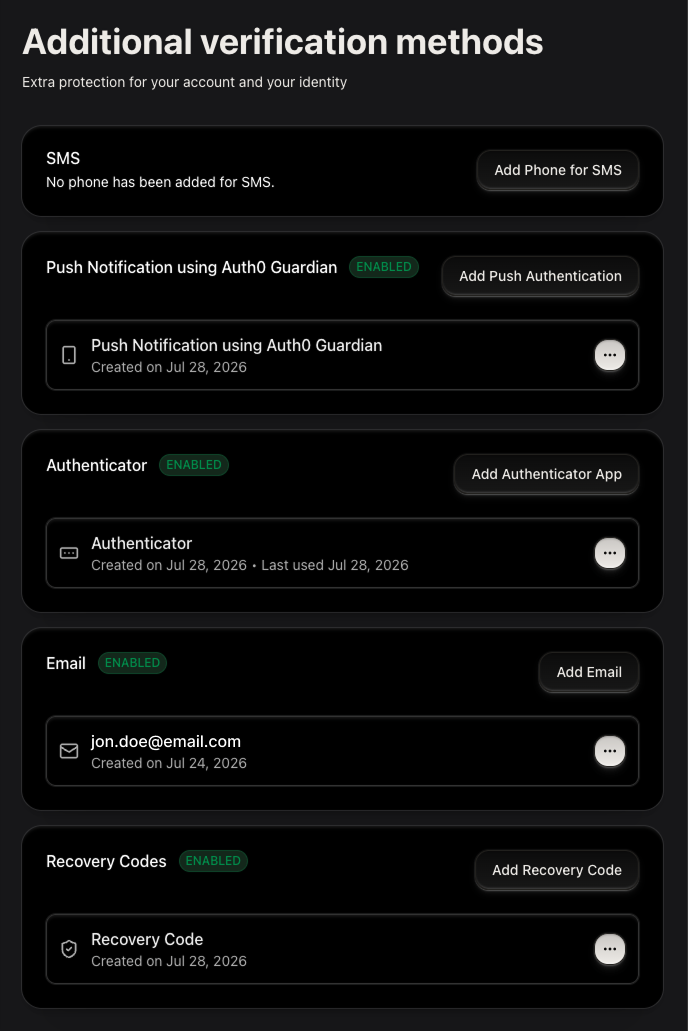
  <img className="hidden dark:block" src="https://mintlify.s3.us-west-1.amazonaws.com/docs-staging/docs/images/universal-components/my-account/web/user-mfa-management-dark.png" alt="User MFA Management component showing available and enrolled verification methods" />
</Frame>

## Supported factors

The component handles every authentication method factor configured with the My Account API.

| **Factor**                                                                                       | **What the component renders**                                                                                            |
| ------------------------------------------------------------------------------------------------ | ------------------------------------------------------------------------------------------------------------------------- |
| [Email OTP](/docs/secure/multi-factor-authentication/configure-mfa-email)                        | Email input → 6-digit OTP verification                                                                                    |
| [SMS OTP](/docs/secure/multi-factor-authentication/configure-sms-notifications-for-mfa)          | Country-code picker + phone entry → 6-digit OTP verification                                                              |
| [TOTP (Authenticator application)](/docs/secure/multi-factor-authentication/configure-otp)       | QR code with manual-entry key → 6-digit OTP verification                                                                  |
| [Push notifications](/docs/secure/multi-factor-authentication/enable-push-notifications-for-mfa) | QR code for [Auth0 Guardian](/docs/secure/multi-factor-authentication/auth0-guardian) scan → "waiting for approval" state |
| [Passkeys](/docs/get-started/universal-components/web/components/user-passkey-management)        | Educational screen → OS biometric prompt → enrolled entry in the list                                                     |
| [Recovery codes](/docs/secure/multi-factor-authentication/configure-recovery-codes-for-mfa)      | Display-once code list with a copy action and an "I've saved my codes" confirmation                                       |

## Configure your application

Select your framework to configure environment variables and universal components.

<Tabs>
  <Tab title="React (SPA)">
    ## Setup requirements

    Before rendering the `UserMFAManagement` component, follow [Build Account Security UI](/docs/get-started/universal-components/web/components/my-account-overview) to configure your Auth0 tenant and applications.

    ### Enable MFA methods and scopes

    **Enable MFA methods**

    1. Navigate to [**Dashboard > Security > Multi-factor Auth**](https://manage.auth0.com/dashboard/#/security/mfa).
    2. Enable the desired factors. To learn more, read [Multi-Factor Authentication Factors](/docs/secure/multi-factor-authentication/multi-factor-authentication-factors#multi-factor-authentication-factors).

    **Configure My Account API permissions**

    Configure the My Account API User-delegated Access permissions in [Build Account Security UI](/docs/get-started/universal-components/web/components/my-account-overview#create-the-application-and-configure-my-account-api-permissions). All five permissions are required for the complete authentication-method management flow.

    ## Install the component

    <CodeGroup>
      ```bash pnpm wrap lines theme={null}
      pnpm add @auth0/universal-components-react react-hook-form @tanstack/react-query
      ```

      ```bash npm wrap lines theme={null}
      npm install @auth0/universal-components-react react-hook-form @tanstack/react-query
      ```
    </CodeGroup>

    <Callout icon="file-lines" color="#0EA5E9" iconType="regular">
      `react-hook-form` and `@tanstack/react-query` are peer dependencies. The command also installs the `@auth0/universal-components-core` dependency for shared utilities and Auth0 integration.
    </Callout>

    ## Get started

    ```tsx wrap lines theme={null}
    import { UserMFAManagement } from "@auth0/universal-components-react";

    export function SecurityPage() {
      return <UserMFAManagement />;
    }
    ```

    <Callout icon="file-lines" color="#0EA5E9" iconType="regular">
      * Components are always imported from the root entry `@auth0/universal-components-react`, regardless of framework.
      * Only the `Auth0ComponentProvider` component uses a framework-specific subpath: `/spa` for React applications, `/rwa` for Next.js applications.
    </Callout>

    <Accordion title="Full integration example">
      ```tsx wrap lines theme={null}
      import React from "react";
      import { UserMFAManagement } from "@auth0/universal-components-react";
      import { Auth0Provider } from "@auth0/auth0-react";
      import { Auth0ComponentProvider } from "@auth0/universal-components-react/spa";
      import { analytics } from "./lib/analytics";

      function SecurityPage() {
        return (
          <div className="max-w-3xl mx-auto p-6">
            <UserMFAManagement
              factorConfig={{
                phone: { visible: true, enabled: true },
                totp: { visible: true, enabled: true },
                "push-notification": { visible: true, enabled: true },
                email: { visible: true, enabled: true },
                "recovery-code": { visible: true, enabled: true },
                "webauthn-platform": { visible: false },
                "webauthn-roaming": { visible: false },
              }}
              enrollAction={{
                onAfter: (factor) => {
                  analytics.track("MFA Factor Enrolled", { factor });
                },
              }}
              deleteAction={{
                onBefore: (factor) => window.confirm(`Remove your ${factor} authenticator?`),
                onAfter: (factor) => {
                  analytics.track("MFA Factor Deleted", { factor });
                },
              }}
              customMessages={{
                header: {
                  title: "Two-Factor Authentication",
                  description: "Manage the extra verification methods used to protect your account.",
                },
              }}
              styling={{
                variables: {
                  light: { "--color-primary": "#4f46e5" },
                  dark: { "--color-primary": "#818cf8" },
                },
              }}
            />
          </div>
        );
      }

      export default function App() {
        const domain = "YOUR_TENANT_DOMAIN.auth0.com";
        const clientId = "YOUR_CLIENT_ID";

        return (
          <Auth0Provider
            domain={domain}
            clientId={clientId}
            authorizationParams={{ redirect_uri: window.location.origin }}
            interactiveErrorHandler="popup"
          >
            <Auth0ComponentProvider domain={domain}>
              <SecurityPage />
            </Auth0ComponentProvider>
          </Auth0Provider>
        );
      }
      ```
    </Accordion>
  </Tab>

  <Tab title="Next.js (RWA)">
    ## Setup requirements

    Before rendering the `UserMFAManagement` component, follow [Build Account Security UI](/docs/get-started/universal-components/web/components/my-account-overview) to configure your Auth0 tenant and applications.

    ### Enable MFA methods and scopes

    **Enable MFA methods**

    1. Navigate to [**Dashboard > Security > Multi-factor Auth**](https://manage.auth0.com/dashboard/#/security/mfa).
    2. Enable the desired factors. To learn more, read [Multi-Factor Authentication Factors](/docs/secure/multi-factor-authentication/multi-factor-authentication-factors#multi-factor-authentication-factors).

    **Configure My Account API permissions**

    Configure the My Account API User-delegated Access permissions in [Build Account Security UI](/docs/get-started/universal-components/web/components/my-account-overview#create-the-application-and-configure-my-account-api-permissions). All five permissions are required for the complete authentication-method management flow.

    ## Install the component

    <CodeGroup>
      ```bash pnpm wrap lines theme={null}
      pnpm add @auth0/universal-components-react react-hook-form @tanstack/react-query
      ```

      ```bash npm wrap lines theme={null}
      npm install @auth0/universal-components-react react-hook-form @tanstack/react-query
      ```
    </CodeGroup>

    <Callout icon="file-lines" color="#0EA5E9" iconType="regular">
      `react-hook-form` and `@tanstack/react-query` are peer dependencies. The command also installs the `@auth0/universal-components-core` dependency for shared utilities and Auth0 integration.
    </Callout>

    ## Get started

    ```tsx app/security/page.tsx wrap lines theme={null}
    "use client";

    import { UserMFAManagement } from "@auth0/universal-components-react";

    export default function SecurityPage() {
      return <UserMFAManagement />;
    }
    ```

    <Accordion title="Full integration example">
      ```tsx app/security/page.tsx wrap lines theme={null}
      "use client";

      import { UserMFAManagement } from "@auth0/universal-components-react";
      import { analytics } from "@/lib/analytics";

      export default function SecurityPage() {
        return (
          <div className="max-w-3xl mx-auto p-6">
            <UserMFAManagement
              factorConfig={{
                phone: { visible: true, enabled: true },
                totp: { visible: true, enabled: true },
                "push-notification": { visible: true, enabled: true },
                email: { visible: true, enabled: true },
                "recovery-code": { visible: true, enabled: true },
                "webauthn-platform": { visible: false },
                "webauthn-roaming": { visible: false },
              }}
              enrollAction={{
                onAfter: (factor) => {
                  analytics.track("MFA Factor Enrolled", { factor });
                },
              }}
              deleteAction={{
                onAfter: (factor) => {
                  analytics.track("MFA Factor Deleted", { factor });
                },
              }}
              customMessages={{
                header: { title: "Two-Factor Authentication" },
              }}
              styling={{
                variables: {
                  light: { "--color-primary": "#4f46e5" },
                  dark: { "--color-primary": "#818cf8" },
                },
              }}
            />
          </div>
        );
      }
      ```
    </Accordion>
  </Tab>

  <Tab title="shadcn">
    ## Setup requirements

    Before rendering the `UserMFAManagement` component, follow [Build Account Security UI](/docs/get-started/universal-components/web/components/my-account-overview) to configure your Auth0 tenant and applications.

    ### Enable MFA methods and scopes

    **Enable MFA methods**

    1. Navigate to [**Dashboard > Security > Multi-factor Auth**](https://manage.auth0.com/dashboard/#/security/mfa).
    2. Enable the desired factors. To learn more, read [Multi-Factor Authentication Factors](/docs/secure/multi-factor-authentication/multi-factor-authentication-factors#multi-factor-authentication-factors).

    **Configure My Account API permissions**

    Configure the My Account API User-delegated Access permissions in [Build Account Security UI](/docs/get-started/universal-components/web/components/my-account-overview#create-the-application-and-configure-my-account-api-permissions). All five permissions are required for the complete authentication-method management flow.

    ## Install the component

    ```bash wrap lines theme={null}
    npx shadcn@latest add https://auth0-universal-components.vercel.app/r/my-account/user-mfa-management.json
    ```

    <Callout icon="file-lines" color="#0EA5E9" iconType="regular">
      The install command adds the component source into `src/components/auth0/my-account/` along with all UI dependencies and the `@auth0/universal-components-core` dependency for shared utilities and Auth0 integration.
    </Callout>

    ## Get started

    ```tsx wrap lines theme={null}
    import { UserMFAManagement } from "@/components/auth0/my-account/user-mfa-management";

    export function SecurityPage() {
      return <UserMFAManagement />;
    }
    ```

    <Accordion title="Full integration example">
      ```tsx wrap lines theme={null}
      import React from "react";
      import { UserMFAManagement } from "@/components/auth0/my-account/user-mfa-management";
      import { Auth0Provider } from "@auth0/auth0-react";
      import { Auth0ComponentProvider } from "@auth0/universal-components-react/spa";
      import { analytics } from "./lib/analytics";

      function SecurityPage() {
        return (
          <div className="max-w-3xl mx-auto p-6">
            <UserMFAManagement
              factorConfig={{
                phone: { visible: true, enabled: true },
                totp: { visible: true, enabled: true },
                "push-notification": { visible: true, enabled: true },
                email: { visible: true, enabled: true },
                "recovery-code": { visible: true, enabled: true },
                "webauthn-platform": { visible: false },
                "webauthn-roaming": { visible: false },
              }}
              enrollAction={{
                onAfter: (factor) => {
                  analytics.track("MFA Factor Enrolled", { factor });
                },
              }}
              deleteAction={{
                onBefore: (factor) => window.confirm(`Remove your ${factor} authenticator?`),
                onAfter: (factor) => {
                  analytics.track("MFA Factor Deleted", { factor });
                },
              }}
              customMessages={{
                header: { title: "Two-Factor Authentication" },
              }}
              styling={{
                variables: {
                  light: { "--color-primary": "#4f46e5" },
                  dark: { "--color-primary": "#818cf8" },
                },
              }}
            />
          </div>
        );
      }

      export default function App() {
        const domain = "YOUR_TENANT_DOMAIN.auth0.com";
        const clientId = "YOUR_CLIENT_ID";

        return (
          <Auth0Provider
            domain={domain}
            clientId={clientId}
            authorizationParams={{ redirect_uri: window.location.origin }}
            interactiveErrorHandler="popup"
          >
            <Auth0ComponentProvider domain={domain}>
              <SecurityPage />
            </Auth0ComponentProvider>
          </Auth0Provider>
        );
      }
      ```
    </Accordion>
  </Tab>
</Tabs>

## Props

### Display props

Display props control how the component renders without affecting its behavior.

<table class="table">
  <thead>
    <tr>
      <th>Prop</th>
      <th>Type</th>
      <th>Default</th>
      <th>Description</th>
    </tr>
  </thead>

  <tbody>
    <tr>
      <td><code>hideHeader</code></td>
      <td><code>boolean</code></td>
      <td><code>false</code></td>
      <td>Hide the component header (title and description).</td>
    </tr>

    <tr>
      <td><code>readOnly</code></td>
      <td><code>boolean</code></td>
      <td><code>false</code></td>
      <td>Disable all mutation actions (enroll and delete). Factors are shown but cannot be added or removed.</td>
    </tr>

    <tr>
      <td><code>showActiveOnly</code></td>
      <td><code>boolean</code></td>
      <td><code>false</code></td>
      <td>Show only factor types that the user has at least one active enrollment for. Factor types with no enrollments are hidden.</td>
    </tr>

    <tr>
      <td><code>disableEnroll</code></td>
      <td><code>boolean</code></td>
      <td><code>false</code></td>
      <td>Hide the enroll button for all factor types. Users can still delete existing factors.</td>
    </tr>

    <tr>
      <td><code>disableDelete</code></td>
      <td><code>boolean</code></td>
      <td><code>false</code></td>
      <td>Hide the delete button on all enrolled factor rows. Users can still enroll new factors.</td>
    </tr>

    <tr>
      <td><code>factorConfig</code></td>
      <td><code>Partial<br />\<Record\<MFAType,<br />\{ visible?: boolean;<br /> enabled?: boolean }>></code></td>
      <td><code>\{}</code></td>
      <td>Per-factor-type visibility and enabled state.</td>
    </tr>
  </tbody>
</table>

**factorConfig**

Use `factorConfig` to show or grey-out specific factor types without editing the tenant configuration.
Each key is a factor type `string`; both fields are optional and default to `true`.

Supported factor type keys: `phone`, `totp`, `email`, `push-notification`, `webauthn-platform`, `webauthn-roaming`, `recovery-code`.

* `visible` renders the factor row in the list (`false` to hide).
* `enabled` renders the factor row is interactive (`false` renders it greyed-out and non-interactive).

```tsx wrap lines theme={null}
<UserMFAManagement
  factorConfig={{
    phone: { visible: true, enabled: true },
    totp: { visible: true, enabled: true },
    email: { visible: true, enabled: false }, // shown but greyed-out
    "webauthn-platform": { visible: false },  // hidden entirely
  }}
/>
```

### Action props

Action props let you hook into the component's enrollment and deletion lifecycle events and trigger or cancel operations.

<table class="table">
  <thead>
    <tr>
      <th>Prop</th>
      <th>Type</th>
      <th>Description</th>
    </tr>
  </thead>

  <tbody>
    <tr>
      <td><code>enrollAction</code></td>
      <td><code>ComponentAction\<MFAType></code></td>
      <td>Lifecycle hooks for factor enrollment. Set <code>disabled: true</code> to disable the enrollment action.</td>
    </tr>

    <tr>
      <td><code>deleteAction</code></td>
      <td><code>ComponentAction\<MFAType></code></td>
      <td>Lifecycle hooks for factor deletion. Set <code>disabled: true</code> to disable the deletion action.</td>
    </tr>
  </tbody>
</table>

**enrollAction**

Use `onBefore` to cancel enrollment before the flow starts. Use `onAfter` to refresh related UI or send analytics after enrollment completes successfully.

```tsx wrap lines theme={null}
<UserMFAManagement
  enrollAction={{
    onBefore: (factor) => window.confirm(`Enroll ${factor}?`),
    onAfter: (factor) => {
      analytics.track("MFA Factor Enrolled", { factor });
    },
  }}
/>
```

**deleteAction**

Use `onBefore` to cancel deletion before the built-in confirmation dialog is shown. `onAfter` runs after a factor is successfully deleted.

```tsx wrap lines theme={null}
<UserMFAManagement
  deleteAction={{
    onBefore: (factor) =>
      window.confirm(`Remove your ${factor} authenticator? You may be locked out if this is your only factor.`),
    onAfter: (factor) => {
      analytics.track("MFA Factor Deleted", { factor });
    },
  }}
/>
```

### Customize props

Customization props let you adapt copy, validation rules, and styling without modifying source code.

<table class="table">
  <thead>
    <tr>
      <th>Prop</th>
      <th>Type</th>
      <th>Description</th>
    </tr>
  </thead>

  <tbody>
    <tr>
      <td><code>customMessages</code></td>
      <td><code>Partial\<UserMfaManagementMessages></code></td>
      <td>Override default UI text and translations.</td>
    </tr>

    <tr>
      <td><code>styling</code></td>
      <td><code>ComponentStyling\<UserMFAManagementClasses></code></td>
      <td>CSS variables and class overrides.</td>
    </tr>

    <tr>
      <td><code>schema</code></td>
      <td><code>\{ email?: RegExp; phone?: RegExp }</code></td>
      <td>Custom validation patterns for email and phone number input fields.</td>
    </tr>
  </tbody>
</table>

**customMessages**

Customize all text and translations. Every field is optional.

<Accordion title="Available Messages">
  **Header** `header.title`, `header.description`, `no_active_mfa`, `loading_text`, `component_error.title`, `component_error.description`

  **Actions** `actions.remove_button_label`, `actions.cancel_button_label`, `actions.confirm_button_label`, `actions.continue_button_label`, `actions.submit_button_label`, `actions.verify_button_label`, `actions.back_button_label`, `actions.deleting_button_text`, `actions.menu_aria_label`

  **Per factor type** (replace `{factor}` with `phone`, `totp`, `email`, `push-notification`, `webauthn-platform`, `webauthn-roaming`, or `recovery-code`) `factors.{factor}.title`, `factors.{factor}.description`, `factors.{factor}.button_text`

  **Notifications** `notifications.factor_enroll_success`, `notifications.factor_remove_success`, `notifications.fetch_factors_error`, `notifications.factor_delete_error`

  **Enrollment and removal** `enrollment` and `remove_factor_dialog`
</Accordion>

```tsx wrap lines theme={null}
<UserMFAManagement
  customMessages={{
    header: {
      title: "Two-Factor Authentication",
      description: "Add extra layers of security to protect your account.",
    },
    no_active_mfa: "You haven't enrolled any authentication methods yet.",
    factors: {
      phone: {
        title: "Text message (SMS)",
        description: "Receive a one-time code via text message.",
        button_text: "Add method",
      },
      totp: {
        title: "Authenticator app",
        description: "Use Google Authenticator, Authy, or any TOTP app.",
      },
    },
    notifications: {
      fetch_factors_error: "Unable to load your security methods.",
    },
  }}
/>
```

**Customize style**

Customize appearance with CSS variables and class overrides. Supports light/dark themes.

<Accordion title="Available Styling Options">
  **Variables**—CSS custom properties

  * `common` Applied to both themes
  * `light` Light mode only
  * `dark` Dark mode only

  **Class overrides**

  * `UserMFAManagement-item` each factor-type card container
  * `EnrollFactorModal-dialogContent` the enrollment multi-step dialog content area
  * `FactorDeleteModal-dialogContent` the delete confirmation dialog content area
</Accordion>

```tsx wrap lines theme={null}
<UserMFAManagement
  styling={{
    variables: {
      light: { "--color-primary": "#4f46e5" },
      dark: { "--color-primary": "#818cf8" },
    },
    classes: {
      "UserMFAManagement-item": "rounded-2xl shadow-md border-2",
      "EnrollFactorModal-dialogContent": "max-w-lg",
      "FactorDeleteModal-dialogContent": "max-w-sm",
    },
  }}
/>
```

**schema**

Override the built-in regex patterns used to validate user input during enrollment. Both fields are optional; unset fields keep their default patterns.

* `email` validates the email address entered during email-OTP enrollment (default: standard RFC-5322-style pattern).
* `phone` validates the phone number entered during SMS enrollment (default: accepts international E.164 format).

```tsx wrap lines theme={null}
<UserMFAManagement
  schema={{
    // Restrict to company domain only
    email: /^[a-zA-Z0-9._%+-]+@example\.com$/,
    // US numbers only
    phone: /^\+1[2-9]\d{2}[2-9]\d{6}$/,
  }}
/>
```

## TypeScript definitions

```typescript wrap lines theme={null}
type MFAType =
  | "phone"
  | "totp"
  | "email"
  | "push-notification"
  | "webauthn-platform"
  | "webauthn-roaming"
  | "recovery-code";

interface FactorConfigOptions {
  visible?: boolean;
  enabled?: boolean;
}

interface UserMFAManagementClasses {
  "UserMFAManagement-item"?: string;
  "EnrollFactorModal-dialogContent"?: string;
  "FactorDeleteModal-dialogContent"?: string;
}

interface ComponentAction<Item, Context = void> {
  disabled?: boolean;
  onBefore?: (item: Item, context?: Context) => boolean;
  onAfter?: (item: Item, context?: Context) => void | boolean | Promise<boolean>;
}

interface UserMFAManagementProps {
  hideHeader?: boolean;
  showActiveOnly?: boolean;
  disableEnroll?: boolean;
  disableDelete?: boolean;
  readOnly?: boolean;
  factorConfig?: Partial<Record<MFAType, FactorConfigOptions>>;
  customMessages?: Partial<UserMfaManagementMessages>;
  styling?: ComponentStyling<UserMFAManagementClasses>;
  schema?: { email?: RegExp; phone?: RegExp };
  enrollAction?: ComponentAction<MFAType>;
  deleteAction?: ComponentAction<MFAType>;
}
```

## Advanced customization

In addition to the component configuration described above, use the `useUserMFA` hook when you need to build a custom MFA management interface.

```tsx wrap lines theme={null}
import { useUserMFA } from "@auth0/universal-components-react";

export function CustomMfaManagement() {
  const {
    factorsByType,
    isLoadingFactors,
    error,
    visibleFactorTypes,
    handleEnroll,
    handleDeleteFactor,
  } = useUserMFA({
    factorConfig: {
      phone: { visible: true, enabled: true },
      totp: { visible: true, enabled: true },
    },
  });

  if (isLoadingFactors) return <p>Loading authentication methods…</p>;
  if (error) return <p role="alert">{error}</p>;

  return (
    <ul>
      {visibleFactorTypes.map((factorType) => (
        <li key={factorType}>
          <button onClick={() => handleEnroll(factorType)}>
            Add {factorType}
          </button>
          {factorsByType[factorType]?.map((factor) => (
            <button
              key={factor.id}
              onClick={() => handleDeleteFactor(factor.id, factorType)}
            >
              Remove {factorType}
            </button>
          ))}
        </li>
      ))}
    </ul>
  );
}
```

The hook accepts `showActiveOnly`, `readOnly`, `disableDelete`, `factorConfig`, `customMessages`, `enrollAction`, and `deleteAction`. It returns factor data, loading and action state, enrollment and deletion state, and the handlers required to implement enrollment, verification, and removal flows.

Use `UserMFAManagement` when you want the built-in interface. If you use the hook, implement the matching enrollment, verification, recovery-code, and deletion UI for the factor types you support.

<Note>
  `onAfter` in `enrollAction` and `deleteAction` runs when the success notification closes, rather than immediately when the action completes.
</Note>

## Learn more

<CardGroup cols={2}>
  <Card title="User Passkey Management" icon="key" href="/docs/get-started/universal-components/web/components/user-passkey-management">
    Manage WebAuthn passkeys with the same lifecycle pattern.
  </Card>

  <Card title="Build a Self-Service Account Security Interface" icon="shield" href="/docs/get-started/universal-components/web/components/my-account-overview">
    Overview, prerequisites, and framework setup for all My Account components.
  </Card>
</CardGroup>
