> ## Documentation Index
> Fetch the complete documentation index at: https://docs-staging.auth0-mintlify.app/llms.txt
> Use this file to discover all available pages before exploring further.
# Configure and Use Online Refresh Tokens
> How to configure and use Online Refresh Tokens.
export const ReleaseStageNotice = ({feature, stage, plans, contact, terms}) => {
const stageTextMap = {
"beta": "Beta",
"ea": "Early Access"
};
const stageText = stageTextMap[stage] || "a product release stage";
const prsLink = "/docs/troubleshoot/product-lifecycle/product-release-stages";
const linkify = (text, url) => {
return {text};
};
const includeDetails = (plans, contact, terms) => {
const hasDetails = terms || plans || contact;
if (!hasDetails) return null;
return
{plans && <>This feature is available for {linkify(`${plans} plans`, "https://auth0.com/pricing")}. }
{contact && "To participate, contact " + contact + ". "}
{terms && <>By using this feature, you agree to the applicable Free Trial terms in Okta's {linkify("Master Subscription Agreement", "https://www.okta.com/legal")}.}
;
};
return
The {feature} feature is in {linkify(stageText, prsLink)}.
{includeDetails(plans, contact, terms)}
;
};
## Configure ORTs
Online Refresh Tokens (ORTs) must be enabled at the [API (Resource Server)](/docs/get-started/apis/api-settings) level using the Auth0 Dashboard or the Management API.
### Configure using the Dashboard
1. Navigate to [Dashboard > Applications > API](https://manage.auth0.com/#/apis).
2. Select the API you want to configure.
3. In the **Settings** tab, enable the **Allow Online Access** toggle.
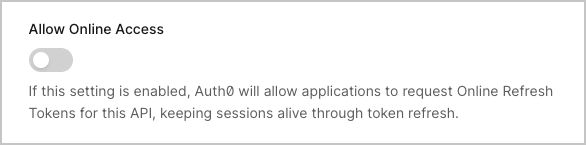 4. Select **Save**.
To review and configure idle timeout and absolute lifetime values for sessions, review the [Tenant Session Expiration](https://manage.auth0.com/#/tenant/advanced) settings. To learn more, read [Configure Session lifetime](/docs/manage-users/sessions/configure-session-lifetime).
### Configure using the Management API
To enable ORTs, make a `PATCH` call to the [Update Resource Server](/docs/api/management/v2/resource-servers/patch-resource-servers-by-id) endpoint:
```bash theme={null}
curl --request PATCH \
--url 'https:///api/v2/resource-servers/' \
--header 'authorization: Bearer ' \
--header 'content-type: application/json' \
--data '{"allow_online_access": true}'
```
To verify the configuration, make a `GET` call to the resource server:
```bash theme={null}
curl --request GET \
--url 'https:///api/v2/resource-servers/' \
--header 'authorization: Bearer '
```
The response includes the `allow_online_access` property:
```json theme={null}
{
"id": "resource-server-id",
"name": "My API",
"identifier": "https://my-api.example.com",
"allow_online_access": true,
...
}
```
## Get an ORT
To get an ORT, include the `online_access` [scope](/docs/get-started/apis/scopes) in your authorization request using the [Authorization Code Flow](/docs/get-started/authentication-and-authorization-flow/authorization-code-flow) or [Authorization Code Flow with PKCE](/docs/get-started/authentication-and-authorization-flow/authorization-code-flow-with-pkce).
```bash theme={null}
https:///authorize \
audience= \
scope=openid profile online_access \
response_type=code \
client_id= \
redirect_uri= \
state=
```
After the user authenticates, exchange the authorization code for tokens:
```bash theme={null}
curl --request POST \
--url 'https:///oauth/token' \
--header 'content-type: application/x-www-form-urlencoded' \
--data grant_type=authorization_code \
--data 'client_id=' \
--data 'code=' \
--data 'redirect_uri=' \
--data 'code_verifier='
```
The token response includes the ORT:
```json theme={null}
{
"access_token": "eyJ...",
"id_token": "eyJ...",
"refresh_token": "ORT...",
"token_type": "Bearer",
"expires_in": 86400
}
```
ORTs are prefixed with `ORT` to distinguish them from refresh tokens. However, you should treat the token as opaque and not rely on its internal structure.
## Use an ORT
Exchange the ORT for a new [access token](/docs/secure/tokens/access-tokens) when the current access token expires or is about to expire:
```bash theme={null}
curl --request POST \
--url 'https:///oauth/token' \
--header 'content-type: application/x-www-form-urlencoded' \
--data grant_type=refresh_token \
--data 'client_id=' \
--data 'refresh_token='
```
The response contains a new access token.
If your request includes an `openid` scope, the response includes a new [ID token](/docs/secure/tokens/id-tokens):
```json theme={null}
{
"access_token": "eyJ...",
"id_token": "eyJ...",
"token_type": "Bearer",
"expires_in": 86400
}
```
Auth0 does not issue a new `refresh_token` and as ORTs do not rotate, you continue using the same ORT for subsequent exchanges.
### Session extension behavior
Each successful token exchange:
* **Resets the session idle timeout:** The idle timeout is restored to its full duration.
* **Does not extend absolute lifetime:** The session's absolute expiration remains unchanged.
* **Maintains SSO:** Other applications can get tokens via SSO as long as the session is alive.
## Revoke an ORT
When you revoke an ORT, it terminates the entire Auth0 session, not just the token. This invalidates all ORTs bound to that session and ends SSO for the user.
```bash theme={null}
curl --request POST \
--url 'https:///oauth/revoke' \
--header 'content-type: application/x-www-form-urlencoded' \
--data 'client_id=' \
--data 'token='
```
## Use ORTs with Actions
You can use ORTs with Auth0 [Actions](/docs/customize/actions/actions-overview) and the [post-login trigger](/docs/customize/actions/explore-triggers/signup-and-login-triggers/login-trigger).
Using Actions you can:
* Use the `event.refresh_token` object to determine if the token is an ORT.
* Access session specific data using the `event.session` object to make decisions based on the current session state
```javascript theme={null}
exports.onExecutePostLogin = async (event, api) => {
// Check if token is an Online refresh token
if (event.refresh_token?.access == 'online') {
// The token is an ORT, you can then reference event.session and api.session
console.log('Exchanging Online Refresh Token bound to Session ID: ', event.session?.id);
// Pull the session metadata and add it in the tokens
// Assuming the session metadata was stored previously
const importantInformation = event.session?.metadata?.importantInformation;
api.accessToken.setCustomClaim('info', importantInformation);
api.idToken.setCustomClaim('info', importantInformation);
}
};
```
Auth0 revokes the entire user session rather than just the token, when the `api.refreshToken.revoke()` method is used with an ORT.
## Learn more
* [Online Refresh Tokens](/docs/secure/tokens/refresh-tokens/online-refresh-tokens/online-refresh-tokens)
* [Refresh Token Rotation](/docs/secure/tokens/refresh-tokens/refresh-token-rotation)
* [Get Refresh Tokens](/docs/secure/tokens/refresh-tokens/get-refresh-tokens)
* [Use Refresh Tokens](/docs/secure/tokens/refresh-tokens/use-refresh-tokens)
* [Session Lifecycle](/docs/manage-users/sessions/session-lifecycle)
* [Configure Silent Authentication](/docs/authenticate/login/configure-silent-authentication)
* [Token Best Practices](/docs/secure/tokens/token-best-practices)
4. Select **Save**.
To review and configure idle timeout and absolute lifetime values for sessions, review the [Tenant Session Expiration](https://manage.auth0.com/#/tenant/advanced) settings. To learn more, read [Configure Session lifetime](/docs/manage-users/sessions/configure-session-lifetime).
### Configure using the Management API
To enable ORTs, make a `PATCH` call to the [Update Resource Server](/docs/api/management/v2/resource-servers/patch-resource-servers-by-id) endpoint:
```bash theme={null}
curl --request PATCH \
--url 'https:///api/v2/resource-servers/' \
--header 'authorization: Bearer ' \
--header 'content-type: application/json' \
--data '{"allow_online_access": true}'
```
To verify the configuration, make a `GET` call to the resource server:
```bash theme={null}
curl --request GET \
--url 'https:///api/v2/resource-servers/' \
--header 'authorization: Bearer '
```
The response includes the `allow_online_access` property:
```json theme={null}
{
"id": "resource-server-id",
"name": "My API",
"identifier": "https://my-api.example.com",
"allow_online_access": true,
...
}
```
## Get an ORT
To get an ORT, include the `online_access` [scope](/docs/get-started/apis/scopes) in your authorization request using the [Authorization Code Flow](/docs/get-started/authentication-and-authorization-flow/authorization-code-flow) or [Authorization Code Flow with PKCE](/docs/get-started/authentication-and-authorization-flow/authorization-code-flow-with-pkce).
```bash theme={null}
https:///authorize \
audience= \
scope=openid profile online_access \
response_type=code \
client_id= \
redirect_uri= \
state=
```
After the user authenticates, exchange the authorization code for tokens:
```bash theme={null}
curl --request POST \
--url 'https:///oauth/token' \
--header 'content-type: application/x-www-form-urlencoded' \
--data grant_type=authorization_code \
--data 'client_id=' \
--data 'code=' \
--data 'redirect_uri=' \
--data 'code_verifier='
```
The token response includes the ORT:
```json theme={null}
{
"access_token": "eyJ...",
"id_token": "eyJ...",
"refresh_token": "ORT...",
"token_type": "Bearer",
"expires_in": 86400
}
```
ORTs are prefixed with `ORT` to distinguish them from refresh tokens. However, you should treat the token as opaque and not rely on its internal structure.
## Use an ORT
Exchange the ORT for a new [access token](/docs/secure/tokens/access-tokens) when the current access token expires or is about to expire:
```bash theme={null}
curl --request POST \
--url 'https:///oauth/token' \
--header 'content-type: application/x-www-form-urlencoded' \
--data grant_type=refresh_token \
--data 'client_id=' \
--data 'refresh_token='
```
The response contains a new access token.
If your request includes an `openid` scope, the response includes a new [ID token](/docs/secure/tokens/id-tokens):
```json theme={null}
{
"access_token": "eyJ...",
"id_token": "eyJ...",
"token_type": "Bearer",
"expires_in": 86400
}
```
Auth0 does not issue a new `refresh_token` and as ORTs do not rotate, you continue using the same ORT for subsequent exchanges.
### Session extension behavior
Each successful token exchange:
* **Resets the session idle timeout:** The idle timeout is restored to its full duration.
* **Does not extend absolute lifetime:** The session's absolute expiration remains unchanged.
* **Maintains SSO:** Other applications can get tokens via SSO as long as the session is alive.
## Revoke an ORT
When you revoke an ORT, it terminates the entire Auth0 session, not just the token. This invalidates all ORTs bound to that session and ends SSO for the user.
```bash theme={null}
curl --request POST \
--url 'https:///oauth/revoke' \
--header 'content-type: application/x-www-form-urlencoded' \
--data 'client_id=' \
--data 'token='
```
## Use ORTs with Actions
You can use ORTs with Auth0 [Actions](/docs/customize/actions/actions-overview) and the [post-login trigger](/docs/customize/actions/explore-triggers/signup-and-login-triggers/login-trigger).
Using Actions you can:
* Use the `event.refresh_token` object to determine if the token is an ORT.
* Access session specific data using the `event.session` object to make decisions based on the current session state
```javascript theme={null}
exports.onExecutePostLogin = async (event, api) => {
// Check if token is an Online refresh token
if (event.refresh_token?.access == 'online') {
// The token is an ORT, you can then reference event.session and api.session
console.log('Exchanging Online Refresh Token bound to Session ID: ', event.session?.id);
// Pull the session metadata and add it in the tokens
// Assuming the session metadata was stored previously
const importantInformation = event.session?.metadata?.importantInformation;
api.accessToken.setCustomClaim('info', importantInformation);
api.idToken.setCustomClaim('info', importantInformation);
}
};
```
Auth0 revokes the entire user session rather than just the token, when the `api.refreshToken.revoke()` method is used with an ORT.
## Learn more
* [Online Refresh Tokens](/docs/secure/tokens/refresh-tokens/online-refresh-tokens/online-refresh-tokens)
* [Refresh Token Rotation](/docs/secure/tokens/refresh-tokens/refresh-token-rotation)
* [Get Refresh Tokens](/docs/secure/tokens/refresh-tokens/get-refresh-tokens)
* [Use Refresh Tokens](/docs/secure/tokens/refresh-tokens/use-refresh-tokens)
* [Session Lifecycle](/docs/manage-users/sessions/session-lifecycle)
* [Configure Silent Authentication](/docs/authenticate/login/configure-silent-authentication)
* [Token Best Practices](/docs/secure/tokens/token-best-practices)