
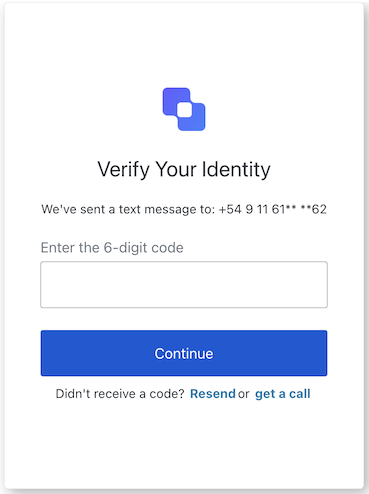
The phone-identifier-challenge screen is displayed when a user needs to verify their phone number by entering a one-time code. It allows the user to submit the code, resend it, switch between SMS and voice delivery, or return to the previous step.
Import
Each screen has its own set of hooks and methods. The SDK supports partial import and root import for each screen.
Using partial import allows you to include only the code you need for your specific use case.
Using root import allows you to load all screens from a single bundle useful when you want a unified build to handle all possible screens.
// root import
import { usePhoneIdentifierChallenge } from '@auth0/auth0-acul-react' ;
// partial import
import {
usePhoneIdentifierChallenge ,
// Context hooks
useUser ,
useTenant ,
useBranding ,
useClient ,
useOrganization ,
usePrompt ,
useScreen ,
useTransaction ,
useUntrustedData ,
// Common hooks
useCurrentScreen ,
useAuth0Themes ,
useErrors ,
useResend ,
// Utility hooks
useChangeLanguage ,
// Methods
submitPhoneChallenge ,
resendCode ,
returnToPrevious ,
switchToText ,
switchToVoice ,
} from '@auth0/auth0-acul-react/phone-identifier-challenge' ;
function PhoneIdentifierChallengeScreen () {
const { submitPhoneChallenge } = usePhoneIdentifierChallenge ();
return (
< button onClick = { () => submitPhoneChallenge ({ code: '123456' }) } > Verify </ button >
);
}
Context Hooks
Screen-scoped hooks that provide read-only access to Auth0 context data on the phone-identifier-challenge screen. Import them from @auth0/auth0-acul-react/phone-identifier-challenge.
This hook provides branding configurations, such as logo, colors, and theme settings displayed on the phone-identifier-challenge screen. import { useBranding } from '@auth0/auth0-acul-react/phone-identifier-challenge' ;
function CustomTheme () {
const branding = useBranding ();
}
This hook provides client-related configurations, such as id, name, and logoUrl, for the phone-identifier-challenge screen. import { useClient } from '@auth0/auth0-acul-react/phone-identifier-challenge' ;
function AppInfo () {
const client = useClient ();
}
This hook provides information about the user’s Organization if the phone challenge is Organization-scoped. Returns null when no Organization context is present. import { useOrganization } from '@auth0/auth0-acul-react/phone-identifier-challenge' ;
function OrgSelector () {
const organization = useOrganization ();
if ( ! organization ) {
return < p > No Organization context </ p > ;
}
}
This hook contains data about the current prompt in the authentication flow. import { usePrompt } from '@auth0/auth0-acul-react/phone-identifier-challenge' ;
function FlowInfo () {
const prompt = usePrompt ();
}
This hook contains details specific to the phone-identifier-challenge screen, including its configuration and context. import { useScreen } from '@auth0/auth0-acul-react/phone-identifier-challenge' ;
function ScreenDebug () {
const screen = useScreen ();
}
This hook contains data related to the tenant, such as id and associated metadata. import { useTenant } from '@auth0/auth0-acul-react/phone-identifier-challenge' ;
function TenantInfo () {
const tenant = useTenant ();
}
This hook provides transaction-specific data for the phone-identifier-challenge screen, such as active connections and current flow state. import { useTransaction } from '@auth0/auth0-acul-react/phone-identifier-challenge' ;
function TransactionInfo () {
const transaction = useTransaction ();
}
This hook handles untrusted data passed to the screen, such as prefilled parameters from URL query strings. import { useUntrustedData } from '@auth0/auth0-acul-react/phone-identifier-challenge' ;
function PrefilledForm () {
const untrustedData = useUntrustedData ();
}
This hook provides details of the active user, including username, email, and available authentication methods. import { useUser } from '@auth0/auth0-acul-react/phone-identifier-challenge' ;
function UserProfile () {
const user = useUser ();
}
usePhoneIdentifierChallenge
This hook returns all methods and context available on the phone-identifier-challenge screen.
Methods
This method submits the one-time code entered by the user to verify their phone number and continues the authentication flow. import { usePhoneIdentifierChallenge } from '@auth0/auth0-acul-react/phone-identifier-challenge' ;
function VerifyButton () {
const { submitPhoneChallenge } = usePhoneIdentifierChallenge ();
return (
< button onClick = { () => submitPhoneChallenge ({ code: '123456' }) } >
Verify
</ button >
);
}
The one-time code entered by the user to verify their phone number.
The CAPTCHA response token, required when CAPTCHA is enabled for the screen.
[`key`: `string`]
"string" | "number" | "boolean" | "undefined"
Any additional custom options.
This method resends the one-time code to the user’s phone number. import { usePhoneIdentifierChallenge } from '@auth0/auth0-acul-react/phone-identifier-challenge' ;
function ResendButton () {
const { resendCode } = usePhoneIdentifierChallenge ();
return (
< button onClick = { () => resendCode () } >
Resend Code
</ button >
);
}
[`key`: `string`]
"string" | "number" | "boolean" | "undefined"
Any additional custom options.
This method navigates the user back to the previous step in the authentication flow. import { usePhoneIdentifierChallenge } from '@auth0/auth0-acul-react/phone-identifier-challenge' ;
function BackButton () {
const { returnToPrevious } = usePhoneIdentifierChallenge ();
return (
< button onClick = { () => returnToPrevious () } >
Back
</ button >
);
}
[`key`: `string`]
"string" | "number" | "boolean" | "undefined"
Any additional custom options.
This method switches the phone verification delivery method to SMS text message. import { usePhoneIdentifierChallenge } from '@auth0/auth0-acul-react/phone-identifier-challenge' ;
function SwitchToSmsButton () {
const { switchToText } = usePhoneIdentifierChallenge ();
return (
< button onClick = { () => switchToText () } >
Send via SMS
</ button >
);
}
[`key`: `string`]
"string" | "number" | "boolean" | "undefined"
Any additional custom options.
This method switches the phone verification delivery method to a voice call. import { usePhoneIdentifierChallenge } from '@auth0/auth0-acul-react/phone-identifier-challenge' ;
function SwitchToVoiceButton () {
const { switchToVoice } = usePhoneIdentifierChallenge ();
return (
< button onClick = { () => switchToVoice () } >
Send via Voice Call
</ button >
);
}
[`key`: `string`]
"string" | "number" | "boolean" | "undefined"
Any additional custom options.
Common/Utility Hooks
This hook gets the current theme options with flattened configuration from branding context.
This hook returns a function for changing the display language on the current ACUL screen.
This hook gets the current screen context and state.
This hook reads and manages server, client, and developer errors on the screen.
This hook manages the resend cooldown state and timer for the resendCode method.